My neighbors across the hall are a straight couple about my age with two small children. Every night, after dinner, while she's cleaning the kitchen, he comes in and starts screaming at her. The topic varies. Sometimes he doesn't like dinner, sometimes he's angry she went grocery shopping, sometimes the kids made a mess and she didn't clean it fast enough. Every night, he screams until she and the kids start crying, and then their apartment gets very, very quiet. On Saturday night, if he stays home, he invariably starts to beat her. I can hear all of this from my apartment. I've called the police several times. She won't press charges, so there's nothing they can do. He doesn't beat the kids--he just screams at them--so child services has no reason to step in. It's awful for her, it's awful for the kids, and it's awful for the rest of us who can do nothing more than what we're already doing.
Earlier this week, the husband stopped me to chat about the kids since their youngest is about the same age as my only. The sight of this man makes my skin crawl. He disgusts me. I only barely managed to be civil and that I only did for the sake of my daughter. I couldn't justify provoking him by speaking my mind when there was a chance she would be in danger.
Today, I stopped the wife to let her know that I can hear what's going on over there and that it sounds frightening and terrible. I told her that if she ever needed anything, if she even needed to just get away, that I am almost always home. She seemed embarrassed and she laughed and explained that they "just fight a lot." I told her I didn't want to embarrass her or be rude, but I was scared for her. And then I pretended I accepted her "fighting" explanation, told her that her kids are adorable, and walked away.
There's really nothing more I can do.
I hate feeling helpless.

Monday, May 14, 2012


Sunday, May 13, 2012
Blog Roundup: May 7 - 13, 2012
Chuck Wendig wrote 25 Things Writers Should Know About Mystery, particularly useful if you're a mystery or suspense writer (or you just want to write something so interesting the reader can't put it down).
Sirra made a great post on word usage. I completely agree with this post. Writers should know the definition of every single word they use, they should choose them carefully, and they should avoid overused and pet words. Of course rules can be broken... but new writers shouldn't break any rules until they learn them all.
...and that's it? What? Maybe everyone is just out enjoying the nice weather?
Sirra made a great post on word usage. I completely agree with this post. Writers should know the definition of every single word they use, they should choose them carefully, and they should avoid overused and pet words. Of course rules can be broken... but new writers shouldn't break any rules until they learn them all.
...and that's it? What? Maybe everyone is just out enjoying the nice weather?
Saturday, May 12, 2012
SitRep Saturday: Slacking and Experimentation
After I finished Right This Time and the formatting post this week, I slacked. I tend to do that once I finish a story. A way to clear my head of it and get ready to throw myself into the next one.
Which is already coming along nicely, I might add. The first story is done, as I've mentioned, and all three are named. I'm looking for a title for the anthology. It bothers me that I don't already have one, but I'll get over it.
What I did do this week was go back to experimenting in fandom. I've mentioned it before, I'm sure, but I used to use fanfiction as a way to develop my skills. I learned a lot about writing, figuring out how to appeal to a target audience, and interacting with that audience in the years I spent in fandom. This week, I started testing Calibre's ability to convert files from PRC to EPUB, MOBI, LRF, PDB, and PDF. The formatting looks okay, but I'm going to play around with it more. I also started using sendspace. See, I've been thinking of opening my own store to sell my books directly. I'm trying to figure out the best way to do that. I think I'll probably end up taking a page from Tim Timebomb's book and setting up a WePay store where readers can buy the book directly and, once payment clears, provide the buyer with a direct link to download. Maybe. Like I said, I'm experimenting.
Which is already coming along nicely, I might add. The first story is done, as I've mentioned, and all three are named. I'm looking for a title for the anthology. It bothers me that I don't already have one, but I'll get over it.
What I did do this week was go back to experimenting in fandom. I've mentioned it before, I'm sure, but I used to use fanfiction as a way to develop my skills. I learned a lot about writing, figuring out how to appeal to a target audience, and interacting with that audience in the years I spent in fandom. This week, I started testing Calibre's ability to convert files from PRC to EPUB, MOBI, LRF, PDB, and PDF. The formatting looks okay, but I'm going to play around with it more. I also started using sendspace. See, I've been thinking of opening my own store to sell my books directly. I'm trying to figure out the best way to do that. I think I'll probably end up taking a page from Tim Timebomb's book and setting up a WePay store where readers can buy the book directly and, once payment clears, provide the buyer with a direct link to download. Maybe. Like I said, I'm experimenting.
Wednesday, May 9, 2012
Self-Publishing: Basic Fiction Formatting for Smashwords in OpenOffice (Part 3: Steps 8 - 9)
Part 1 (steps 1 - 4) of this series is here and Part 2 (steps 5 - 7) is here. Today, we're going to create and format the copyright and title pages. Click on any image below to enlarge it.
Step 8: Copyright Page
Step 8a: Highlight your text, select "more..." from the formatting menu, right-click "default" and select "new..."
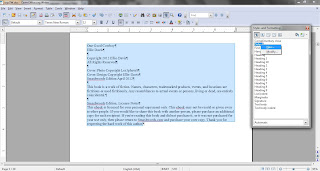
Step 8b: Name the new style.

Step 8c: Set indents and spacing to 0.00"

Step 8d: Center text.

Step 8e: Select font, typeface, and size
Don't get fancy. Stick with Times New Roman in Regular and 12pt.

This is what it should look like when you're done:

For some reason, my copyright page formatting doesn't always show up the way it should in all formats. I haven't quite figured out why that is. When it is successful, these are the steps I take. It's just the copyright page and it doesn't turn out as an eyesore (usually it just comes out left-justified, which isn't the end of the world) so I don't worry about it, but it can be vexing. I just wanted to warn you.
Step 9: Title Page
These steps are pretty much the same as for the copyright page. The only main difference is the change in text size, and that is an entirely personal decision. I go with 14pt font.


Too easy? Maybe. But I'm giving you a break. Next time, we're going to create the "extra" book pages and a linked table of contents.
Step 8: Copyright Page
Before I start showing you the pictures, here's the text you're going to need for your copyright page. Now, the Style Guide doesn't give you the disclaimer. It doesn't even require the License Notes, or cover photo/design credit, but I add all of these things because I think it just looks professional. It's up to you. Verify with the Style Guide what the requirements are. Feel free to copy and paste the text below and replace the placeholders with your information.
Title
by Author
Copyright 2011 Author
All Rights Reserved
Cover Photo by Photographer
Cover Design by Designer
Smashwords Edition Month Year
This book is a work of fiction. Names,
characters, trademarked products, events, and locations are
fictitious or are used fictitiously. Any
resemblances to actual events or persons, living or dead, are
entirely coincidental.
Smashwords Edition License Notes
This ebook is licensed for your personal
enjoyment only. This ebook may not be re-sold
or given away to other people. If you
would like to share this book with another person,
please purchase an additional copy for
each recipient. If you’re reading this book and did
not purchase it, or it was not purchased
for your use only, then please return to
Smashwords.com and purchase your own
copy. Thank you for respecting the hard work
of
this author.
Step 8a: Highlight your text, select "more..." from the formatting menu, right-click "default" and select "new..."

Step 8b: Name the new style.

Step 8c: Set indents and spacing to 0.00"
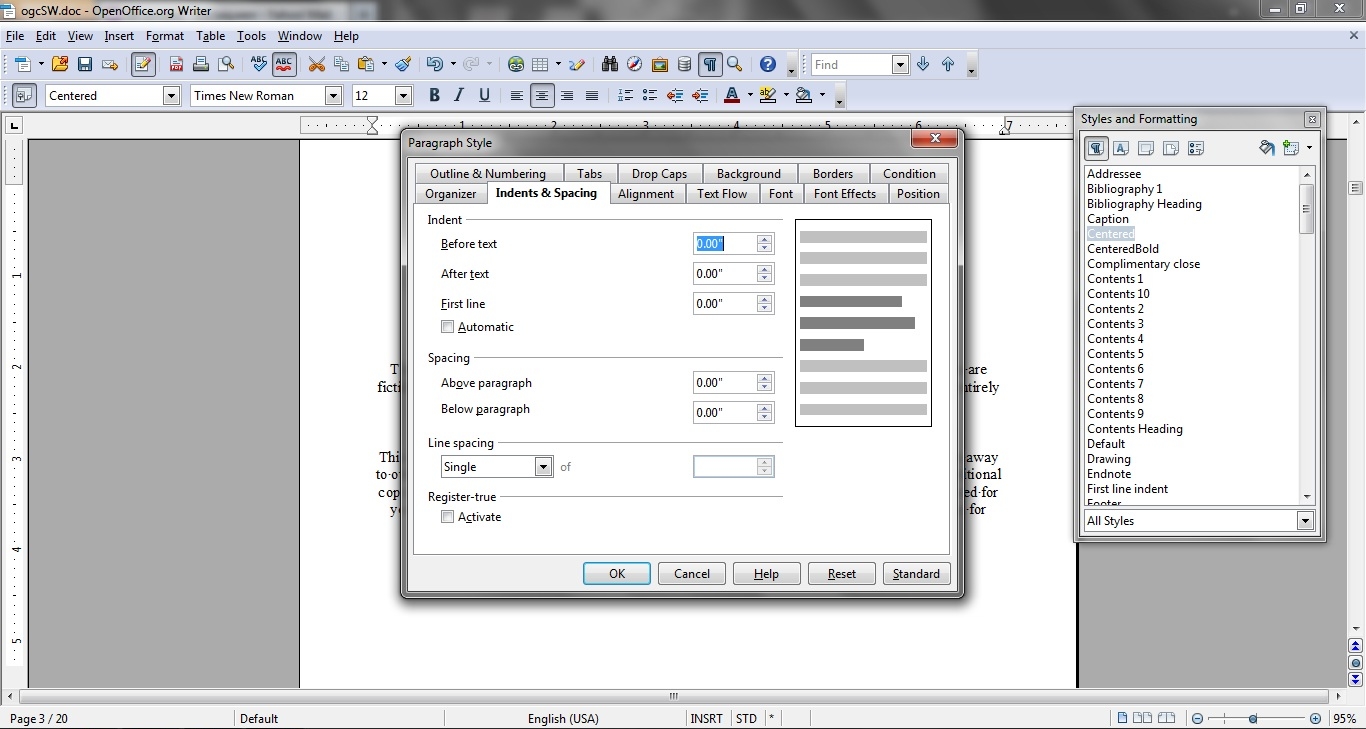
Step 8d: Center text.

Step 8e: Select font, typeface, and size
Don't get fancy. Stick with Times New Roman in Regular and 12pt.

This is what it should look like when you're done:

For some reason, my copyright page formatting doesn't always show up the way it should in all formats. I haven't quite figured out why that is. When it is successful, these are the steps I take. It's just the copyright page and it doesn't turn out as an eyesore (usually it just comes out left-justified, which isn't the end of the world) so I don't worry about it, but it can be vexing. I just wanted to warn you.
Step 9: Title Page
These steps are pretty much the same as for the copyright page. The only main difference is the change in text size, and that is an entirely personal decision. I go with 14pt font.


Too easy? Maybe. But I'm giving you a break. Next time, we're going to create the "extra" book pages and a linked table of contents.
Release News Update: Right This Time

It's also available at AllRomance, if you prefer to do your shopping there.
And it's now up at Amazon, too! US site, UK site, DE site, FR site, ES site, and IT site.
Still waiting on premium catalog approval over at Smashwords, but I'll let you know.
Monday, May 7, 2012
Monday Miscellany: News Roundup
Time for bullet points!
- If you're on tumblr and you're looking for a reader's blog to follow, this is me. If you're on tumblr and you have a reading/reader's blog, please let me know so I can follow you.
- All of my books are now available at AllRomance! Cass Gets Her Kicks, The Cowboy Next Door, Better with You, Please, Sir, One Good Cowboy, and Right This Time are available in PDF, HTML, PRC, and EPUB formats.
- I'm already about halfway through the draft of my next project, an anthology of three ~5,000 word short stories. The first one, set in Venice, is drafted... and it is good.
- This week, I am determined to finish the formatting guide. Expect that. And a post on sales, if I can get to it.
- Man, I want to write a zombie story. Bad.
Sunday, May 6, 2012
Blog Roundup: April 30 - May 6, 2012
Chuck Wendig shared 25 Realizations Writers Need To Have. I mean, is there anything the man does know? He also posted on the touchy subject of ebook pricing. I'm a fan of reading everything I can on a subject and getting a lot of perspectives, so this was interesting to me. (I, for the record, price my books for my target audience.)
Greta van der Rol interviewed her character, Morgan, to talk about the fact that she (Ms. van der Rol) is going to write a sequel to Morgan's Choice. Is anyone else excited? I know I am!
Erotic Romance offered this short, question-filled post on "dishonest ebook returns." Here's my take: Amazon's return policy is good for both readers--who can shop with confidence knowing that if they're dissatisfied in any way that they can get their money back--and authors--who want to foster consumer confidence. If you're seeing a high number of returns, maybe it's time to check your formatting or story (and maybe even your book price). Most readers don't return books just because they don't like them. Some will, of course; pirates are everywhere. But most readers don't. (I've bought several books in the last year that I thought were just awful. And I didn't return any of them. This is a common thread among readers I know. My book returns reflect this: I see perhaps one or two returns for every 150 - 200 books sold.)
James Killick wants to tell you how to free the genius inside. I think he has some good points.
Stella Deleuze's Tip of the Week was on blogging and doing it right. She has some good points. I'd add something, though. Define your audience. I floundered for a while when I first started this blog. I'm floundering with the tumblr I just started. Define your audience as quickly as you can and write to them. That will get visitors to your blog and, maybe, readers to your books.
Clearly, I need new blogs to follow.
Greta van der Rol interviewed her character, Morgan, to talk about the fact that she (Ms. van der Rol) is going to write a sequel to Morgan's Choice. Is anyone else excited? I know I am!
Erotic Romance offered this short, question-filled post on "dishonest ebook returns." Here's my take: Amazon's return policy is good for both readers--who can shop with confidence knowing that if they're dissatisfied in any way that they can get their money back--and authors--who want to foster consumer confidence. If you're seeing a high number of returns, maybe it's time to check your formatting or story (and maybe even your book price). Most readers don't return books just because they don't like them. Some will, of course; pirates are everywhere. But most readers don't. (I've bought several books in the last year that I thought were just awful. And I didn't return any of them. This is a common thread among readers I know. My book returns reflect this: I see perhaps one or two returns for every 150 - 200 books sold.)
James Killick wants to tell you how to free the genius inside. I think he has some good points.
Stella Deleuze's Tip of the Week was on blogging and doing it right. She has some good points. I'd add something, though. Define your audience. I floundered for a while when I first started this blog. I'm floundering with the tumblr I just started. Define your audience as quickly as you can and write to them. That will get visitors to your blog and, maybe, readers to your books.
Clearly, I need new blogs to follow.
Release News: Right This Time
Life is too short to spend it repressed and unsatisfied. It took twelve years for Rachel to realize that she deserved better than an empty, passionless marriage and once she did, she stopped wasting time. Divorced and ready to fulfill long-kept fantasies of thoroughly enjoyable sex, she has found a willing partner in Eric. Starting tonight, they're going to get it right this time.
Saturday, May 5, 2012
SitRep Saturday: So Close!
I am so, so close to being done with Right This Time. In fact, I finished the next-to-final editing pass last night. Today, I'll format the file, export it as a PDF, have Adobe read it to me, and make any final changes necessary before I send it to Smashwords, Amazon, and the like. Are you excited? I'm excited. Halfway through this story, I changed my whole mental approach to my writing and now, finally, I feel like I know how to get back to who I am as a writer. I figured out how to remove the mental blocks that had kept me from being totally honest. Now, things should be much easier for me.
I mean, I'm already halfway through the next project.
Stay tuned! I'll have an update for you on Right This Time and tell you where you can get it and how long it'll be free.
I mean, I'm already halfway through the next project.
Stay tuned! I'll have an update for you on Right This Time and tell you where you can get it and how long it'll be free.
Wednesday, May 2, 2012
Self-Publishing: Basic Fiction Formatting for Smashwords in OpenOffice (Part 2: Steps 5 - 7)
In this post last week, I showed you how to get your OpenOffice text document ready for formatting. It has just now occurred to me one crucial detail I forgot to mention: When you save your file, use file extension .doc because that's the only extension Smashwords will accept.

Sorry about that. After I started formatting for Smashwords regularly, I just saved all of my text documents with the Word extension. I completely forgot that this guide is for those of you who aren't doing this regularly just yet.
Anyway, moving on. Today we're going to learn how to choose our paragraph separation method and then apply that to the text body.
You have two choices for separating your paragraphs: first line indent and block paragraph. Pick one.
In the Smashwords Style Guide, Mark Coker explains that his guide is formatted using the block paragraph method (paragraphs look like blog post paragraphs) which is "common for some non-fiction." If you're formatting a non-fiction work, especially if it has photos, and you're using block paragraph... these aren't the posts you're looking for. I've never tried formatting with block paragraphs and all of my attempts at including photos in my books haven't exactly been successful. As soon as I figure it out, expect to see a post or more on the subject. Until then, I refer you back to the Smashwords Style Guide and suggest you implement the spirit of the instructions.
First line indent is the type of paragraph separation you're probably most familiar with. Pick up any fiction book nearby and you'll see paragraphs arranged on the page without any spaces between them, just a little indent at the beginning of the first line. In school, you were probably taught to create that indent with a tab. No. Tabs are bad. Very, very bad. If you have them in your document, get rid of them now. Go ahead. I'll wait.
All done? Good. Let's get started. As before, click on any image below to enlarge.
Step 5: Default Formatting
Ctrl + A to select your text and then select "default" from the list of formatting options. This is going to normalize your text and make it easier for you to format without any surprises popping up.

This is what your default indents and spacing options should look like:

And this is what your default text options should look like:

Don't get fancy with your font choices. Stick with Times New Roman. Not only because it looks the most professional, but because the default choice will be easier for the different electronic readers to display and to convert when the e-reader has been hacked to the owner's preferences.
Step 6: Applying and Formatting First Line Indent
If you've never formatted paragraphs before, this step might be a bit cumbersome.
Step 6a: Select "More..." from the formatting menu

Step 6b: Select "first line indent" and left click; select "modify"


Step 6c: Verify indent measurements
Everything but first line should be 0. First line should be no more than 0.25" because of the different sizes of ereader screens. I like the 0.20" default setting. It looks nice and translates well to every reader I've used.

Step 6d: Verify spacing measurements
For some reason, my copy of OpenOffice defaults to 0.08" below paragraph. I haven't figured out how to change the default permanently yet, so I go in each time I use this paragraph style to change it. If you know how to make the settings permanent, please share!

It should be 0 like everything else.

Step 7: Click "OK"
Ta-da! Your paragraphs should look like this:

Next post: creating and formatting the copyright and title pages.

Sorry about that. After I started formatting for Smashwords regularly, I just saved all of my text documents with the Word extension. I completely forgot that this guide is for those of you who aren't doing this regularly just yet.
Anyway, moving on. Today we're going to learn how to choose our paragraph separation method and then apply that to the text body.
You have two choices for separating your paragraphs: first line indent and block paragraph. Pick one.
In the Smashwords Style Guide, Mark Coker explains that his guide is formatted using the block paragraph method (paragraphs look like blog post paragraphs) which is "common for some non-fiction." If you're formatting a non-fiction work, especially if it has photos, and you're using block paragraph... these aren't the posts you're looking for. I've never tried formatting with block paragraphs and all of my attempts at including photos in my books haven't exactly been successful. As soon as I figure it out, expect to see a post or more on the subject. Until then, I refer you back to the Smashwords Style Guide and suggest you implement the spirit of the instructions.
First line indent is the type of paragraph separation you're probably most familiar with. Pick up any fiction book nearby and you'll see paragraphs arranged on the page without any spaces between them, just a little indent at the beginning of the first line. In school, you were probably taught to create that indent with a tab. No. Tabs are bad. Very, very bad. If you have them in your document, get rid of them now. Go ahead. I'll wait.
All done? Good. Let's get started. As before, click on any image below to enlarge.
Step 5: Default Formatting
Ctrl + A to select your text and then select "default" from the list of formatting options. This is going to normalize your text and make it easier for you to format without any surprises popping up.

This is what your default indents and spacing options should look like:

And this is what your default text options should look like:

Don't get fancy with your font choices. Stick with Times New Roman. Not only because it looks the most professional, but because the default choice will be easier for the different electronic readers to display and to convert when the e-reader has been hacked to the owner's preferences.
Step 6: Applying and Formatting First Line Indent
If you've never formatted paragraphs before, this step might be a bit cumbersome.
Step 6a: Select "More..." from the formatting menu

Step 6b: Select "first line indent" and left click; select "modify"


Step 6c: Verify indent measurements
Everything but first line should be 0. First line should be no more than 0.25" because of the different sizes of ereader screens. I like the 0.20" default setting. It looks nice and translates well to every reader I've used.

Step 6d: Verify spacing measurements
For some reason, my copy of OpenOffice defaults to 0.08" below paragraph. I haven't figured out how to change the default permanently yet, so I go in each time I use this paragraph style to change it. If you know how to make the settings permanent, please share!

It should be 0 like everything else.

Step 7: Click "OK"
Ta-da! Your paragraphs should look like this:

Next post: creating and formatting the copyright and title pages.
Subscribe to:
Posts (Atom)